
GDPR Compliant Form Builder Requirements in Plain English

GDPR compliant form builder requirements include more than adding a consent checkbox: your forms need a lawful basis, clear privacy notice, data minimization, security controls, retention rules, and a way to honor user rights. A form builder can provide the features, but your organization still decides why data is collected and remains responsible for how it is used.
> Definition: A GDPR compliant form builder is an online form tool that helps you collect personal data from EU residents with transparency, lawful processing, security controls, and data subject rights workflows built into the form collection process.
TL;DR
- A GDPR-ready form should explain what data you collect, why you collect it, who receives it, and how long it is kept.
- Consent must be specific, informed, freely given, and opt-in when consent is the lawful basis; one generic checkbox is not enough for every purpose.
- Software features help, but the business, school, nonprofit, or creator using the form remains the data controller for most form collection decisions.
GDPR Form Builder Requirements at a Glance
A GDPR-ready form builder should help you show privacy notices, document lawful basis, collect opt-in consent, minimize fields, secure responses, set retention rules, export or delete data, and review processor terms. GDPR applies when forms collect personal data from EU residents, including contact forms, surveys, quizzes, registrations, support forms, and lead capture pages.
Tools like Forms AI can support the practical form-building side. Forms AI is a form builder app that helps small businesses, teachers, event organizers, marketers, nonprofits, and freelancers create forms, surveys, quizzes, and registrations with AI templates and drag-and-drop editing.
Start with the form’s job.
If an event organizer is checking RSVP counts in a parking lot while a vendor texts about table numbers, the form still needs clear collection text. “Meal preference” may be needed. “Birthday” probably is not.
Five GDPR Forms Facts Every Form Owner Should Know
- Opt-in consent must be unticked when consent is used. A checked box that users must undo is not a clear affirmative action.
- The organization using the form usually remains the data controller. The form tool may process data, but the form owner decides why the data is collected.
- Data minimization means asking only for fields that are truly needed. A simple contact form usually does not need date of birth, job title, and full address.
- Purpose limitation means data should not be reused for unrelated goals without a valid basis. A quiz response should not quietly become a marketing profile.
- Security and governance features should include encryption, retention settings, export, delete, access controls, audit logs, and a DPA. As of 2023, EU authorities had imposed more than €4 billion in GDPR fines since 2018, according to the EDPB and EDPS joint opinion source.
For small teams, data minimization for forms is often easier than retroactive cleanup because fewer fields create fewer downstream copies.
What a GDPR Compliant Form Builder Can and Cannot Cover
A GDPR compliant form builder can support compliant collection, but it cannot make every use of the collected data lawful.
The software side can help with form fields, privacy notice placement, consent controls, response security, data exports, deletion workflows, and processor documentation. That matters because trust is now part of conversion. In Cisco’s 2023 Data Privacy Benchmark Study, 95% of organizations said customers would not buy from them if they did not trust their data practices. source.
However, the tool cannot choose your lawful basis, write a privacy policy that matches your actual operations, guarantee lawful use inside your CRM, or make your whole website compliant. The appointment clipboard beside the register may become a phone link, but the same accountability follows the data.
Good AI form builder apps help people create forms, surveys, quizzes, and registrations with intuitive drag-and-drop editing and smart templates, not a legal shield for every processing decision.
How GDPR Form Collection Works Behind the Scenes
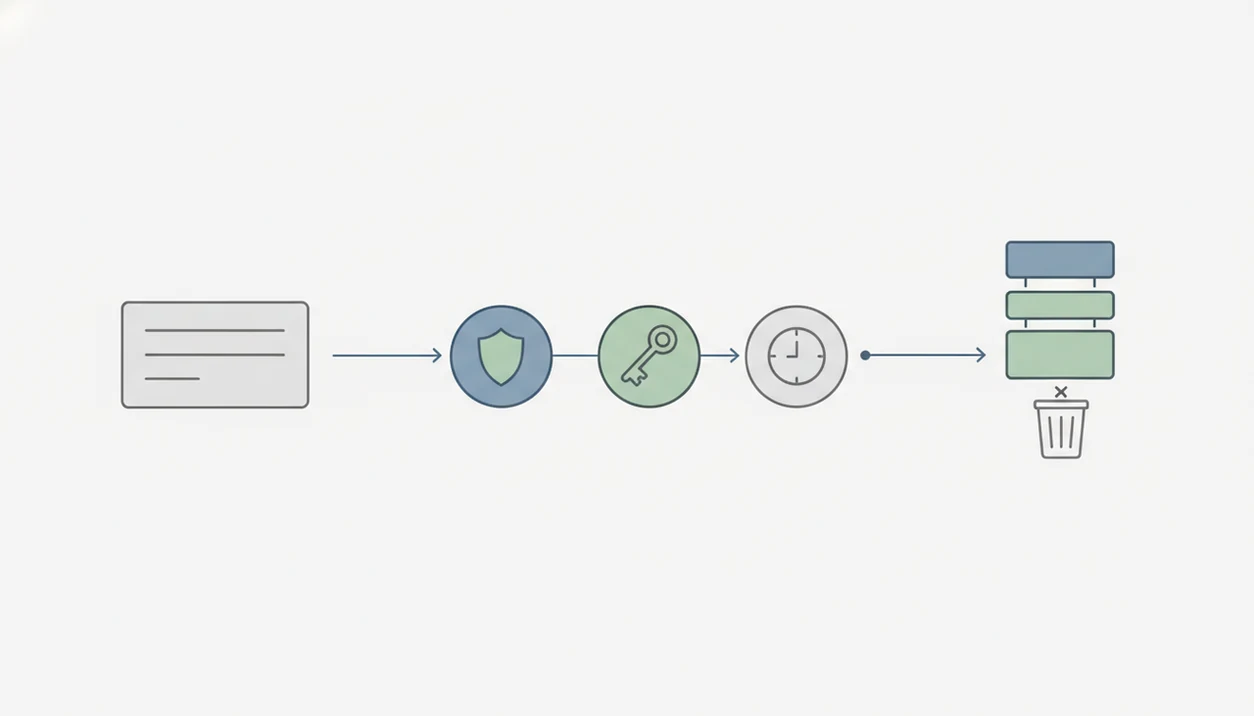
GDPR form collection works as a data flow: the user sees a notice, submits fields, a lawful basis or consent record is captured, the response is stored, integrations may receive data, and retention or deletion rules apply later. The form owner is usually the controller. The form builder is usually a processor when it stores or handles responses for that owner.
Two terms matter here: controller means the party deciding why and how data is used, and processor means the party handling data on the controller’s behalf. In plain English, the form owner gives the instructions.
AI adds another layer. Prompts, generated templates, logs, and response data may all need notice and processor coverage if personal data is involved. If a teacher uses AI to draft a student feedback form before dismissal, suggested fields still need review before sharing.
Online form privacy EU expectations start at the point of collection. A hidden privacy policy link is not enough by itself.
Lawful Basis and Form Consent GDPR Rules
Does every GDPR form need a consent checkbox? No. Consent is only one lawful basis under GDPR, and it may not be the right basis for every form.
Consent Is Not Always the Lawful Basis
Some forms may rely on consent, contract, legitimate interests, legal obligation, vital interests, or public task, depending on the context; these are the GDPR lawful bases listed in Article 6 source. A customer support form may not need marketing consent to answer the support request. A paid event registration form may need payment and attendance details to provide the service.
When consent is the basis, it must be specific, informed, freely given, unambiguous, and easy to withdraw. Pre-ticked boxes, bundled consent, and vague lines like “I agree to everything” are weak patterns. The GDPR consent standard comes from Article 4 and Article 7, and the UK ICO also states that consent must be a clear, affirmative opt-in source. UK ICO research found that 84% of UK adults wanted more control and choice over how personal data is used.
Granular Consent Fields for Forms
Use separate choices for separate purposes. Example: “Send me event updates,” “Subscribe me to the monthly newsletter,” and “Share my details with event partners” should not be one checkbox.
Plain beats clever.
For form consent GDPR design, the strongest pattern is a short, specific opt-in beside the relevant field, with withdrawal instructions nearby.
GDPR Form Fields, Privacy Notices, and Data Minimization
Every field should map to a specific purpose. If the field cannot be explained in one plain sentence, remove it or rewrite the form’s purpose.
Field-by-Field Purpose Check
Do not ask for date of birth on a simple contact form unless age is genuinely required. Do not request health information, children’s data, identity documents, or employment details unless the use case needs special safeguards. A “Parent/guardian name” field makes sense for a school trip form, but not for a product waitlist.
AI-generated templates need the same review. Smart suggestions can save time, but they may add fields that feel normal in a template and unnecessary in your workflow. The AI generated form review checklist is useful before publishing a template built from a prompt.
Short Privacy Text Beside the Form
Place concise collection text near the submit button and link to the full privacy notice. In a 2021 European Commission report, 69% of EU internet users were concerned about companies using data for another purpose. source.
That worry is practical. People notice.
Security, Retention, and Data Rights in GDPR Forms
After submission, GDPR form work shifts from design to operations: secure the response, limit access, keep it only as long as needed, and support rights requests. A form that looks clean on the page can still create messy copies behind the scenes.
Response Storage and Access Controls
Look for encryption in transit and at rest, secure user permissions, role-based access, and audit logs. Not every volunteer, teacher aide, contractor, or sales rep should see every response. A donation interest form in a church basement may feel low-tech, but the response list still contains personal data.
Retention settings should match the purpose. Keep responses long enough to complete the task, meet documented obligations, or resolve likely follow-up questions. Then delete or anonymize them according to the retention rule.
Export, Correction, and Deletion Workflows
Data subject rights may include access, correction, deletion, restriction, objection, and portability where applicable. Self-service workflows or clear request channels make those requests easier to handle.
Deleting a form is not the same as deleting all copies in exports, integrations, backups, CRMs, or email notifications. That duplicate email column in the spreadsheet still counts.
Common GDPR Form Consent Myths
- Myth: a GDPR compliant form builder makes the whole business compliant. The tool can support safer collection, but your organization still controls purpose, lawful basis, retention, and downstream use.
- Myth: one privacy policy checkbox covers all future marketing and profiling. GDPR consent needs specific choices for distinct uses, not one blanket approval.
- Myth: GDPR only matters for newsletter forms. Contact forms, registration forms, surveys, quizzes, support forms, and intake forms can all collect personal data from EU residents.
- Myth: deleting the form dashboard item erases all personal data everywhere. Exports, integrations, backups, and notification emails may still hold copies.
- Myth: long legal text alone makes consent informed. Plain-language notices near the form are better for users and easier to defend.
For broader safety basics beyond GDPR, a safe online form builder review should include access control, data storage, and sharing behavior.
When to Seek Professional Privacy or Legal Advice
Seek professional privacy or legal advice when a form collects sensitive or high-risk data, changes how responses will be used, or triggers an incident. A form builder can support better workflows, but it cannot replace a review of your facts, contracts, and regulatory duties.
Use extra help when the form touches children, health details, financial records, employment decisions, identity documents, or other information that would cause real harm if exposed. Cross-border transfers, profiling, and automated decisions also deserve specialist privacy review because the risk is not only the field on the form, but what happens after submission.
A simple escalation path helps small teams move quickly:
- Pause any new or expanded use of responses when the purpose changes, especially unrelated marketing, analytics, profiling, or audience building.
- Ask counsel or a privacy professional to confirm the lawful basis, notice language, retention period, and consent design.
- Validate processor terms, DPAs, access controls, deletion rules, and integration behavior before publishing or importing old responses.
- Escalate immediately after a breach, data rights request, complaint, or regulator inquiry instead of trying to fix it quietly in the dashboard.
Limitations
No article or form builder can guarantee GDPR compliance in every situation. Use this guide as a practical starting point, not legal advice.
- A form builder cannot choose or justify your lawful basis for processing.
- No software can guarantee 100% GDPR compliance because people can misuse exports, integrations, or stored responses.
- Generic GDPR templates may not fit health, employment, finance, children’s data, or other high-risk use cases.
- AI form features may create extra questions around prompts, logs, model training, and generated outputs.
- A DPA and privacy notice still need to match your actual data flows.
- Backups, email notifications, spreadsheets, CRMs, and third-party integrations may hold copies after a form is deleted.
- Payment, health, and accessibility issues may require separate review; start with PCI compliant payment form requirements, HIPAA friendly form builder considerations, or an accessible form design checklist when those topics apply.
- For legal interpretation, speak with a qualified privacy professional or attorney.
FAQ
What makes a form GDPR compliant?
A GDPR-ready form has a lawful basis, clear collection notice, minimal fields, secure storage, retention rules, and a way to handle data rights. The form owner also needs processor terms and matching internal practices.
Do GDPR forms always need a consent checkbox?
No, consent is required only when consent is the chosen lawful basis. Other lawful bases may apply, but transparency, minimization, security, retention, and rights handling still matter.
Can GDPR consent boxes be pre-ticked?
No, pre-ticked boxes are not valid opt-in consent under GDPR standards. Consent should require a clear affirmative action from the person submitting the form.
What does form consent mean under GDPR?
Form consent means the person knowingly agrees to a specific use of their personal data. It must be freely given, informed, unambiguous, and easy to withdraw.
Are contact forms covered by GDPR?
Yes, contact forms are covered when they collect personal data from EU residents. Names, email addresses, phone numbers, and message details can all be personal data.
Who is the data controller for an online form?
The organization using the form is usually the data controller because it decides why the data is collected. This can include a small business, school, nonprofit, freelancer, or event organizer.
Is a form builder a data processor under GDPR?
A form builder commonly acts as a data processor when it stores or handles responses for the form owner. Tools such as Forms AI should be reviewed for processor terms, security controls, and data handling practices.
What is data minimization in a GDPR form?
Data minimization means collecting only the personal data needed for a specific purpose. If “Preferred appointment time” is enough, do not also require date of birth or home address.
How long can a GDPR form keep personal data?
Retention depends on the purpose, legal obligations, and documented retention rules. Forms AI and similar tools may offer deletion or export features, but the form owner sets the retention policy.
Does deleting a form also delete all response data?
Not always. Deletion must account for form responses, exports, integrations, backups, email notifications, and downstream systems connected to the form.