
Jotform vs Google Forms Payments for Order Forms

Jotform is the stronger choice for payment-ready order forms because it has native payment fields, product options, and gateway integrations, while Google Forms needs add-ons or redirects. For most businesses comparing Jotform vs Google Forms payments, Google Forms is best for free response collection and Jotform is better for collecting money inside the form. Forms AI fits the earlier step, when you need to draft and edit a clean order, registration, or intake form quickly from your phone.
Definition: Jotform vs Google Forms payments compares whether a form builder can collect order details and money in one reliable flow, either through native payment fields or external workarounds.
- Choose Jotform for paid registrations, product order forms, deposits, donations, bookings, coupons, taxes, and multi-gateway checkout flows.
- Choose Google Forms when you need a free, simple form that sends responses to Google Sheets and payment can happen separately.
- Consider Forms AI when you want an app-first AI form builder to create branded forms, surveys, quizzes, and registrations quickly with templates and drag-and-drop editing.
Jotform vs google forms payments, side by side
Side-by-side captures of the compared products. Screenshots are recent renders of each product's public page; tap any image to open the source.

Jotform vs Google Forms payments at a glance
Jotform vs Google Forms payments comes down to native checkout versus free simplicity. Jotform wins for taking payment inside the form; Google Forms wins when you only need a basic response list.
Source check: Jotform lists payment widgets and integrations for gateways such as Stripe, PayPal, Square, and others at https://www.jotform.com/payment-integrations/, while Google Forms help centers on question-based response collection rather than native checkout fields at https://support.google.com/docs/topic/9055404.
| Comparison point | Jotform | Google Forms |
|---|---|---|
| Native payment fields | Yes, with payment widgets and gateways | No native credit card or checkout field |
| Processors | Stripe, PayPal, Square, Apple Pay, and others | Requires add-ons, links, or separate checkout pages |
| Order fields | Product lists, quantities, options, totals | Basic questions, not true order fields |
| Conditional pricing | Supported through logic and calculated flows | Limited without add-ons or scripting |
| Limits | Plan-based submissions, storage, and payment limits | Free for most basic form use |
| Branding | More control on paid tiers | Limited form styling |
| Spreadsheet workflows | Exports and integrations | Strong Google Sheets connection |
A price estimate note on a workbench needs different tooling than a staff lunch poll. Keep the required fields few, then decide whether money must move before the form is complete.
Five facts about Jotform order forms and Google Forms payments
These five facts explain most payment form decisions before pricing pages enter the conversation. They also show why a “free form” can become costly when checkout has to be patched together later.
- Jotform has built-in payment fields and integrations with Stripe, PayPal, Square, Apple Pay, and other supported gateways.
- Google Forms has no native credit card, digital wallet, or checkout field.
- Jotform supports product lists, quantities, coupons, tax-style fields, conditional logic, and order-style layouts.
- Google Forms is free for basic use and connects tightly with Google Sheets for response storage.
- Jotform paid plans may be needed for higher limits, branding removal, and advanced payment workflows.
For small teams comparing tools after a failed payment link, the real question is not only cost. It is whether the form can turn answers into next steps without manual cleanup.
Payment form checkout mechanics for Jotform and Google Forms
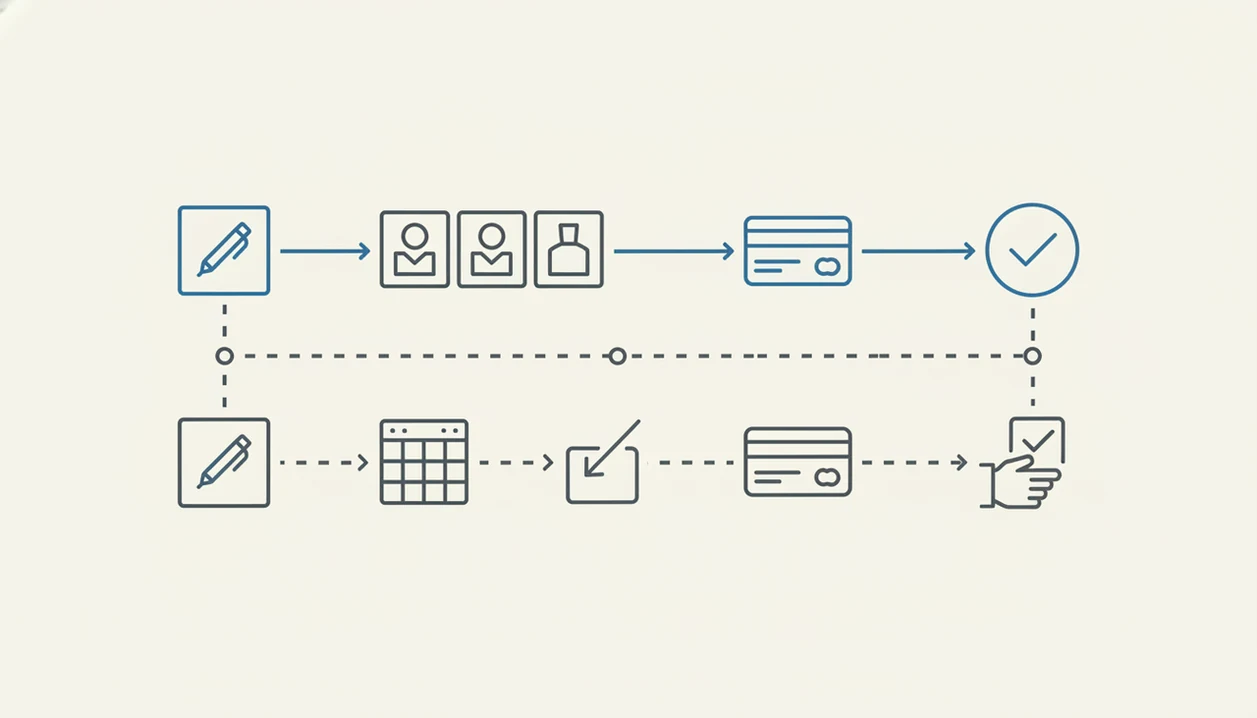
A native payment form combines customer data, product selection, pricing logic, and payment authorization in one submission flow. Google Forms usually captures the data first, then relies on an add-on, payment link, invoice, or manual follow-up.
That difference matters because each extra step creates a new place to lose the buyer. Someone fills out “Volunteer shift,” selects a T-shirt size, then misses the separate payment link. Now the response list says yes, the payment record says no, and someone has to reconcile both. Messy.
Payment processors still handle the sensitive card transaction when a form builder displays a payment field. The form builder shapes the checkout experience, but Stripe, PayPal, Square, or another gateway usually controls authorization, disputes, account reviews, and processor-side rules.
For example, Stripe and PayPal document separate dispute, chargeback, and account-risk processes, so the processor's rules can affect a payment form even when the form builder itself is working correctly: https://docs.stripe.com/disputes and https://www.paypal.com/us/business/manage-risk.
Good payment form builders deliver clear checkout, structured fields, and fewer handoffs, not a replacement for accounting, tax review, or ecommerce operations.
How to Use Jotform or Google Forms for Payment Workflows
Use Jotform or Google Forms for payment workflows by deciding first whether the form is only collecting intent or confirming a paid order. The safest setup keeps fields, payment proof, and follow-up ownership clear before anyone shares the link.
- Decide whether payment is required: Choose whether a submission should count only after payment clears, or whether staff can accept a form response first and collect money later by link, invoice, or manual follow-up.
- Build the form fields first: Add names, contact details, order choices, quantities, dates, consent language, and any required notes before connecting gateways, payment links, or add-ons.
- Test one small payment path: Run a low-value test from both a phone and a desktop browser, including confirmation messages, required fields, and any redirect back from checkout.
- Match the records: Compare the form response with the payment, invoice, or gateway record so the order status is not based on guesswork.
- Assign the edge cases: Document who handles refunds, failed charges, duplicate submissions, missing emails, and buyers who paid but did not finish the form.
Where Jotform payments win for order forms
Jotform is usually better when the form itself needs to collect money, calculate totals, and store order details together. That includes paid registrations, bookings, deposits, donations, service requests, and small product orders.
Native checkout inside the form
Jotform lets the respondent choose an item, enter contact details, and reach payment without a separate checkout detour. That helps when an event organizer is checking RSVP counts in a parking lot while a vendor texts about table numbers. One response record is easier to trust than a form entry plus a separate payment hunt.
Event organizers trying to collect paid registrations should favor Jotform when payment must happen before the RSVP counts as confirmed because native gateway fields keep registration and payment in one workflow.
Order fields and pricing logic
Product menus, quantities, optional add-ons, conditional logic, discounts, and tax-style fields make Jotform more order-aware than Google Forms. Multi-gateway support also matches buyer expectations for cards, wallets, and familiar checkout options.
Small businesses looking for a cleaner order form can use Forms AI to draft the plain-language questions first because AI templates and drag-and-drop editing help shape fields like “Preferred appointment time” before the payment workflow is finalized.
Where Google Forms payment workarounds still make sense
Does Google Forms work for payments if you use links or add-ons? Yes, but it fits low-risk workflows where payment is not the main event and volume is small.
Google Forms is useful for free surveys, school forms, internal requests, simple signups, and spreadsheet-first tracking. A teacher can copy a quiz link into a class announcement five minutes before the bell, then watch responses land in Google Sheets. That is exactly where Google Forms feels comfortable.
For paid workflows, a payment link can work when only a few people need to pay and someone is already checking the list manually. A club treasurer collecting five class fees may tolerate that.
Treat that setup as a manual reconciliation workflow, not a true checkout system. Someone should compare the form response, the payment record, and the confirmation message before marking the order complete.
The tradeoff shows up with serious order forms, client payments, or high-volume registrations. Add-ons and redirects are more likely to create support questions, missing payments, and duplicate columns before export. For a broader comparison, the Forms AI vs Google Forms guide covers form creation speed and mobile editing beyond payments.
Jotform vs Google Forms payment costs, limits, and policies
Google Forms is free for most basic use through Google accounts or Google Workspace. Jotform is freemium, so advanced usage may require paid tiers once submissions, storage, payment volume, branding, or workflow needs grow.
Verify current limits before launch: Jotform publishes plan-based submission, storage, branding, and payment limits at https://www.jotform.com/pricing/, and Google documents Workspace storage behavior for account data at https://support.google.com/a/answer/9214707.
| Cost or policy area | Jotform | Google Forms |
|---|---|---|
| Base access | Free tier plus paid plans | Free for basic use |
| Submission limits | Plan-based | Generally generous for simple forms |
| Payment limits | May depend on plan and gateway setup | No native payment submissions |
| Storage | Plan-based file and response limits | Tied to Google account or Workspace storage |
| Branding removal | Usually a paid-plan factor | Limited branding control |
| Feature access | More payment and order features on higher tiers | Strong basic forms and Sheets workflow |
| Gateway duties | Processor fees, disputes, holds, reviews | Same duties if using external checkout |
Stripe, PayPal, Square, and other gateways can charge fees and enforce their own account rules. PCI scope, privacy, tax, refund, and data retention duties still need human review. For safer field planning, use a safe online form builder checklist before collecting sensitive order details.
Evidence and Source Notes for Jotform vs Google Forms Payments
The core evidence is straightforward: Jotform documents payment integrations and plan limits, while Google Forms documentation focuses on building forms and collecting responses. That supports the main distinction between native payment forms and response-first forms.
This comparison verified Jotform’s payment gateway positioning from its own payment integration documentation and checked plan-based limits against Jotform pricing notes, including submissions, storage, branding, and payment-related limits. Google’s side was verified from Google Forms help content, which describes question types, response collection, quizzes, sharing, and Sheets-style workflows rather than a built-in checkout field. See Jotform’s payment integrations and Google’s Forms help for the primary references.
Keep three evidence checks separate when planning a live order form:
- Confirm form-builder limits for submissions, storage, branding, file uploads, and payment volume.
- Review processor fees with the gateway handling cards, wallets, refunds, and settlement.
- Check dispute policies with Stripe, PayPal, Square, or the processor actually moving the money.
Vendor features, prices, plan names, and gateway availability can change, so treat this as a setup framework, not a permanent contract term.
How to choose a Google Forms payment alternative
A Google Forms payment alternative should match the payment type, not just the form layout. Start with the form’s job, then decide whether checkout belongs inside the form or in a separate system.
- Map the payment type: Decide whether you are collecting deposits, donations, class fees, merch orders, bookings, or invoices.
- List the required processors: Confirm whether buyers expect Stripe, PayPal, Square, Apple Pay, cards, or another supported gateway.
- Define the order logic: Write down quantities, product choices, discounts, taxes, required fields, and conditional paths.
- Check limits and branding: Compare submission caps, payment limits, file storage, custom branding, and notification needs.
- Review compliance duties: Confirm privacy, refund, tax, data retention, and PCI-related responsibilities with the right internal owner.
- Build and preview: Use Forms AI when you need an AI Form Builder to draft smart, branded forms quickly, then test every price and required field before sharing.
Nonprofits collecting donations often need different fields than a freelancer taking a deposit. The best Google Forms alternative app guide can help if speed and mobile creation matter as much as payment setup.
Decision rule for Jotform order forms vs Google Forms
Use the tool that matches the moment money changes hands. For paid order flows, structure and checkout reliability matter more than a free starting price.
Jotform for payment-first forms: Choose Jotform when payment must happen inside the form, pricing changes by selection, or order details need structure. Good examples include event registration, deposits, donations, bookings, merch orders, and service request fees.
Google Forms for response-first forms: Choose Google Forms when the form is free, internal, survey-like, or payment can happen separately. It fits intake forms, staff requests, classroom signups, and lightweight tracking in Google Sheets.
Forms AI for fast form drafting: Review Forms AI when speed, AI templates, mobile creation, and simple drag-and-drop editing matter. A small business owner editing an order form from a phone between customer calls can start with the AI Form Builder, preview the fields, and refine the shareable link before deciding on checkout.
For many small teams, Jotform is easier than Google Forms for paid order forms because product fields, payment integrations, and conditional logic live in the same form workflow.
Common myths about Jotform vs Google Forms payments
Payment form comparison gets confusing because “form,” “checkout,” and “processor” are often used like the same word. They are not.
- Myth: Google Forms directly processes credit card payments. Google Forms has no native credit card payment field, so payments need add-ons, links, redirects, or manual collection.
- Myth: Jotform payments are unlimited on every plan. Jotform has plan-based limits, and higher-volume payment workflows may require a paid tier.
- Myth: A Google Forms add-on makes it equivalent to Jotform. Add-ons can help, but they do not turn Google Forms into a native order form builder.
- Myth: Payment forms are only for ecommerce stores. Deposits, donations, class fees, paid workshops, and appointment bookings often need payment-capable forms.
- Myth: AI-generated payment forms do not need human QA. Every AI-created form still needs testing for totals, required fields, confirmation messages, and refund language.
For teams comparing newer builders, the AI form builder vs traditional form builder breakdown is useful before rebuilding a checkout process.
Limitations
Neither Jotform nor Google Forms removes the operational work behind payment collection. The form can reduce confusion, but someone still owns the policies, records, and edge cases.
- Jotform can become expensive for higher limits, advanced workflows, and unbranded forms.
- Google Forms payment setups can be fragile because add-ons, links, permissions, and redirects can break or change.
- Neither option fully replaces a dedicated ecommerce platform for complex inventory, tax, shipping, discounts, or catalog logic.
- Payment gateways can freeze accounts, decline payments, hold funds, or enforce policies independently of the form builder.
- Security, PCI scope, privacy laws, refund policies, tax rules, and data retention need human review.
- AI-generated forms from any tool still require testing for price accuracy, required fields, accessibility, and compliance.
- Google Sheets workflows can become cluttered when staff add manual payment status columns or duplicate email fields.
- Jotform order forms still need careful previewing on mobile, especially when product menus and conditional sections stack.
A QR code checked under fluorescent lights may work fine in preview. Still test it on mobile data before guests arrive.
FAQ
Can Google Forms take payments?
Google Forms has no native payment field. Payments require add-ons, payment links, redirects, invoices, or manual collection outside the form.
Does Jotform process payments directly?
Jotform provides payment fields and gateway integrations. Processors such as Stripe, PayPal, Square, or similar services handle the actual transaction.
Is Jotform better for order forms?
Jotform is usually better for order forms because it supports product fields, quantities, conditional logic, and payment integrations. Google Forms is stronger for simple response collection.
Is Google Forms free for payments?
Google Forms itself is free for basic use. Payment add-ons, gateways, or separate checkout tools may still charge fees.
What payment processors work with Jotform?
Jotform commonly supports processors such as Stripe, PayPal, Square, Apple Pay, and other gateways. Verify current availability before building a live payment form.
Are Google Forms payment add-ons safe?
Safety depends on the add-on, requested permissions, processor, maintenance, and your privacy requirements. Review permissions and data handling before using one.
Which tool has better checkout branding?
Jotform usually offers stronger branded order form options, especially on paid plans. Google Forms has more limited customization and often sends payment to a separate page.
What is a Google Forms payment alternative?
A Google Forms payment alternative is a tool with native or easier payment collection, such as Jotform for order forms. Forms AI can help create forms faster, but payment handling should be verified before launch.