
Form Launch Timeline From Draft to First Response
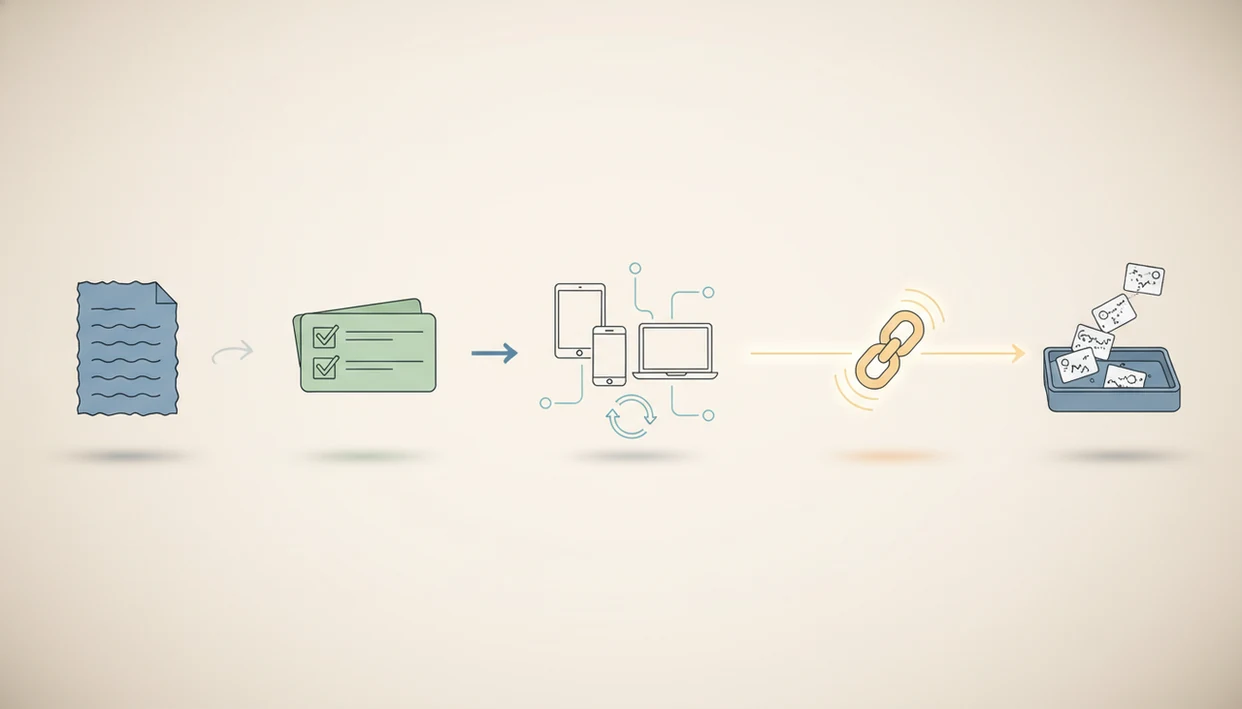
A form launch timeline maps the work from first draft to review, testing, publishing, and first-response follow-up so you can launch without missed fields, broken logic, or lost submissions. For most new forms, plan the timeline in phases: draft, internal review, QA, launch, 24–72 hour monitoring, and a short post-launch improvement pass.
> A form launch timeline is the step-by-step schedule for taking a new online form, survey, quiz, registration, or lead form from draft to live responses with owners, checks, and follow-up actions.
- Use AI and templates to speed up the first draft, but always add human review for clarity, bias, consent, and compliance.
- Test logic, required fields, mobile layout, accessibility, notifications, integrations, and analytics before publishing.
- Monitor the first 24–72 hours closely because early responses reveal technical errors, confusing questions, and drop-off points.
Form Launch Timeline Definition and At-a-Glance Schedule
A form launch timeline is the working schedule that moves a form from idea to live collection without skipping review, testing, or follow-up. It is useful for surveys, quizzes, registrations, lead forms, event forms, intake forms, and order forms.
| Phase | Typical task | Output |
|---|---|---|
| Draft | Write the first questions | Usable form draft |
| Review | Check clarity, consent, and ownership | Approved version |
| QA | Test logic, devices, and notifications | Publish-ready form |
| Launch | Turn on the live link or embed | Public form |
| Monitor | Watch first responses | Fast fixes |
| Improve | Review early data | Cleaner template |
A simple event RSVP may move through this in one afternoon. A payment form or HR intake should take longer. Tools like Forms AI can help create the first draft quickly from a phone, but the schedule still needs a human owner.
How a Form Launch Timeline Works
A form launch timeline works by separating creation from approval, testing, release, and live monitoring. Each phase reduces a different risk, so a form is not judged ready just because the questions look finished.
- Draft the form with AI, templates, or reused fields to move quickly, then have a person check intent, tone, consent, and missing context.
- Assign ownership and version notes so one person approves changes and everyone can see what changed between drafts.
- Test the form in QA, meaning quality assurance, to catch broken logic, required-field traps, mobile layout issues, and notification failures before real people use it.
- Launch with a live test that follows the response data path: field entry, saved submission, confirmation message, notification, integration, and analytics event.
- Monitor early responses for drop-offs, strange answers, delayed alerts, or empty dashboards.
This is where AI is useful but limited. It can speed the first draft and suggest cleaner wording, but human judgment still decides whether the data is necessary, fair, compliant, and usable.
How to Use a Form Launch Timeline
Use a form launch timeline by turning the idea into a short sequence of accountable checks before anyone shares the link. The goal is not to slow publishing; it is to make sure the form collects the right data and sends it to the right place.
- Define the form goal, audience, owner, and response data before writing fields. A school signup, client intake, and lead form may all need names and emails, but they support different decisions.
- Draft the questions, then cut anything that does not help the next action. If a field will not change the booking, approval, score, or follow-up, it probably does not belong.
- Assign reviewers for plain language, consent, compliance risk, and routing logic. Keep one final owner so edits do not drift.
- Test mobile layout, accessibility behavior, integrations, notifications, analytics, and at least one live submission outside the editor.
- Publish only through planned channels, then watch the first responses for 24–72 hours. Early answers often show confusing labels, broken alerts, or fields people are avoiding.
New Form Launch Timeline Workflow and Data Flow
A reliable new form launch works because each phase checks a different risk: question quality, reviewer approval, form behavior, live access, and response handling. The workflow is draft questions, assign review, test behavior, publish, then monitor responses.
Here is the data flow underneath it. A respondent enters answers into fields. The form saves a submission to a response list, triggers notifications, passes data into integrations, and records analytics such as starts, errors, and completions. One broken step can hide real submissions.
Small errors show up late.
Forms AI is a form builder app that helps small businesses, teachers, event organizers, marketers, nonprofits, and freelancers create forms, surveys, quizzes, and registrations with AI templates and drag-and-drop editing. AI can shorten drafting, but it cannot confirm legal wording, accessibility behavior, or whether “Parent/guardian name” is required for your actual process.
Pre-Draft Form Requirements and Publish Checklist Inputs
Before drafting, define the job of the form and the decision it supports. A publish form checklist is weaker when the team starts by adding fields instead of deciding what the response should make possible.
- Goal: Name the outcome, such as booking appointments, collecting RSVPs, grading a quiz, or qualifying leads.
- Audience: Write for the respondent’s context, not your internal spreadsheet. A parent opening a link from a text needs fewer surprises.
- Owner: Assign one person to approve edits, manage version notes, and decide when to publish.
- Data: Choose required fields, then remove anything you do not need. Collect only what you need.
- Controls: Prepare consent, privacy, payment, HR, or legal review when the form touches sensitive data.
Set analytics for starts, submissions, validation errors, and abandonments before launch. If you expect later edits, decide how versions will be named. Version 1.1 beats “final-final-new.”
Step 1: Draft the New Form Launch Questions
Start with an AI template or a smart prompt, then shape the form around one job. For a registration form, that might mean attendee name, email, ticket type, accessibility needs, and meal choice. Not every nice-to-know question belongs.
Group questions by purpose: identity, eligibility, preference, consent, and next step. Clear labels and helper text reduce guessing. “Preferred appointment time” is better than “Availability,” especially on a phone screen in a busy shop.
Shorter forms usually perform better. A BMJ randomized trial found that shortening and simplifying questionnaires increased response rates by 12–19 percentage points (https://www.bmj.com/content/324/7347/1183), which supports pruning before launch.
Flag sensitive or risky questions for review. That includes health details, demographic questions, minors, employment status, payment data, and anything that could steer the answer. An AI-generated draft is a draft, not approval.
Step 2: Review the Form Launch Timeline With Stakeholders
Review the form launch timeline with stakeholders after the draft is readable, not while every field is still moving. Assign one final owner so five reviewers do not rewrite the same question in five different tones.
Use the review to check clarity, tone, required fields, routing logic, consent language, and brand fit. For a food pantry signup beside canned goods, plain wording matters more than polished language. People need to know what will happen after they submit.
Add extra review for payments, medical information, HR forms, minors, and regulated data. AI-generated questions also need bias and compliance review because confident wording can still be wrong.
Do not build a board meeting around a low-risk contact form. For simple forms, a named owner and one careful reviewer are often enough because speed matters when the link needs to go out today.
Step 3: Run the Form Testing Timeline Before Publish
Run the form testing timeline before publishing so you catch broken logic, blocked submissions, confusing layouts, and silent notification failures. One successful laptop submission is not enough.
Functional QA checks
Test required fields, validation rules, conditional logic, branching, scoring, and confirmation messages. Submit realistic answers, not just “test test.” Verify file uploads, payment steps, CRM sync, spreadsheet sync, autoresponders, and email notifications. In one event test, the RSVP count looked right, but the vendor notification never arrived.
A commonly cited PwC consumer experience survey reported that 32% of customers would stop doing business with a brand they loved after one bad experience (https://www.pwc.com/us/en/services/consulting/library/consumer-intelligence-series/future-of-customer-experience.html), which is a practical reason to test before sharing a public link.
Device and accessibility checks
Check desktop, mobile, tablet, and major browsers. Mobile-friendly survey layouts have been shown to improve completion in online survey experiments; cite the specific study you are relying on here, or soften the claim to: 'Mobile-friendly layouts can improve completion, so small layout issues matter.' If your team builds mostly from phones, a mobile form builder app workflow can make this easier.
Test labels, keyboard navigation, contrast, error messages, and screen reader behavior. Progress indicators may help for short, predictable forms, but they can feel discouraging on long forms.
Step 4: Publish the Form Checklist on Launch Day
Launch day is the handoff from controlled testing to real respondents. Switch the form from draft to live, then confirm the public link or embed works before anyone shares it.
Submit one final live test from an outside device, mobile data, or an incognito session. This catches permission issues that internal previews hide. Confirm analytics, notifications, thank-you pages, redirects, and integrations fire correctly. If you plan to embed form on website, test the embedded version, not only the standalone link.
Only share through planned channels after live verification. That may mean email, SMS, a website button, a QR code, a class announcement, or a social post. Record the launch time, version, audience, and distribution channels. Boring notes become useful when someone asks why Wednesday’s responses look different.
Step 5: Monitor First Responses After the New Form Launch
Monitor the first 24–72 hours after a new form launch because early responses reveal what testing missed. Watch submissions, errors, drop-offs, duplicate entries, confused answers, and delayed notifications.
Track completion rate, start-to-submit rate, field-level errors, mobile performance, and notification delivery. An event organizer checking RSVP counts in a parking lot while a vendor texts about table numbers needs the response list to be accurate right then.
Fix minor copy, layout, or validation problems quickly, and document each change. Do not change core survey questions without version notes because it can affect measurement. If you keep this 50–70% first-week response-time claim, add the exact meta-analysis URL inline; otherwise soften it to: 'Many web surveys receive a large share of responses early, so the first week is quality control with real traffic.'
For time-sensitive campaigns, the first week is not passive. It is quality control with real traffic.
Forms AI Workflow for a Form Launch Timeline
Use this workflow when applying the timeline inside an AI form builder. It keeps the process practical without treating AI output as finished work.
- Start with an AI template for the form type, such as survey, quiz, RSVP, intake, lead form, or order form.
- Edit the questions with drag-and-drop controls, keeping required fields few and labels plain.
- Review sensitive wording, consent language, routing logic, and any field that affects payment or eligibility.
- Test the form on mobile, desktop, and at least one outside session before sharing.
- Publish the verified link, QR code, or embed only after a live submission succeeds.
- Review early submissions and prune questions that are causing errors or abandonment.
A good AI form builder app for creating forms, surveys, quizzes, and registrations with intuitive drag-and-drop and smart templates should deliver faster drafts, not judgment-free publishing.
Common Form Launch Timeline Mistakes to Avoid
Most launch failures come from treating the draft as the finish line. Avoid these common mistakes before a contact form, quiz, payment form, or registration link reaches real people.
- The instant-publish mistake: Do not assume an AI-generated draft is ready to publish. Read every label, option, and consent line.
- The laptop-only mistake: Do not test only on a laptop. The teacher copying a quiz link five minutes before the bell needs it to work on student phones too.
- The silent-integration mistake: Do not skip notification, CRM, spreadsheet, payment, or autoresponder testing.
- The over-collection mistake: Do not collect sensitive data just because a field is easy to add.
- The launch-is-done mistake: Do not ignore the first 24–72 hours.
- The invisible-edit mistake: Do not make undocumented mid-campaign changes.
For surveys built mainly on mobile, our how to make survey on phone guide covers the smaller screen decisions in more detail.
Form Launch Verification Checklist Before You Call It Done
A form launch is complete only after live submissions prove the system works. Use these checks after the monitoring window, not before it.
- Responses arrive: Confirm real submissions are landing in the correct response list, sheet, inbox, CRM, or database.
- Notifications run: Confirm automations fired for real respondents, not just internal test accounts.
- Data looks usable: Review early completion, drop-off, duplicate, and error patterns.
- Access issues are handled: Check that no urgent mobile, accessibility, validation, or browser problems remain.
- Next review is scheduled: Set a one-week or two-week cool-down review to prune questions and update reusable templates.
For community events or window signs, QR code form sharing can help, but only after the live link has passed verification. The most useful reusable template is the one improved after real responses, not the one saved on launch day.
Limitations
A form launch timeline reduces avoidable mistakes, but it does not remove every risk. Treat it as an operating checklist, not a legal, security, or research guarantee.
- AI form builders cannot reliably judge legal, privacy, accessibility, or industry-specific compliance language.
- Rare devices, older browsers, assistive technologies, and unusual user behavior may still reveal problems after launch.
- Too many approvals can delay time-sensitive forms, especially event registrations and emergency intake.
- Changing key questions mid-collection can introduce measurement bias and make responses harder to compare.
- A good timeline cannot fix a weak offer, unclear incentive, or poorly targeted audience.
- High-stakes forms need security review, consent review, legal input, rollback planning, and sometimes specialist support.
- Payment, medical, HR, and forms involving minors should have extra review before publication.
Pause the form when harm is likely. A missed lead is easier to repair than mishandled sensitive data.
FAQ
What is a form launch timeline?
A form launch timeline is the schedule for moving a form from draft to review, testing, launch, monitoring, and post-launch improvement. It assigns owners and checks for each phase.
How long should form testing take?
A simple form may need 30–60 minutes of testing. Moderate forms often need a few hours, while payment, HR, medical, or regulated forms may need several days.
What should I test before publishing?
Test required fields, validation, branching, mobile layout, accessibility, notifications, integrations, analytics, and confirmation messages. Also test one live submission outside your editor.
Can AI create launch-ready forms?
AI can create a strong first draft, but human review and QA are still required. Forms AI can help draft and edit forms, but it cannot replace compliance review.
When should I review first responses?
Review first responses within 24–72 hours after launch. Schedule another review after one week to check completion patterns and cleanup needs.
Can I edit after launch?
Minor typo, helper text, and layout edits are usually safe. Changes to core survey questions, scoring, or eligibility logic need version notes.
Who owns the launch checklist?
One accountable owner should coordinate reviewers, testing, publishing, and monitoring. Without one owner, final decisions tend to drift.
Do payment forms need extra steps?
Yes, payment forms need added security checks, consent language, payment testing, compliance review, and rollback planning. Test the full payment path before sharing the link.